
Using the keyboard to update assessment points
There may be times when it is quicker to use the keyboard to update assessment points rather than using your mouse. Assessment points can be updated using the letter on the keyboard that represents the achievement type.
- Select an assessment point or multiple assessment points.
- Using your keyboard, select the letter for the corresponding achievement type.
- The assessment point(s) will update.
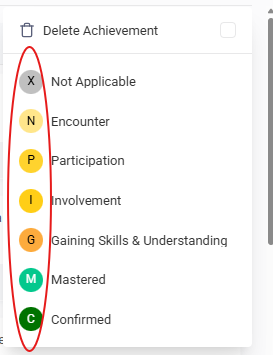
NOTE: Frameworks can have different achievement types. You can also customise the achievement types that your setting uses by visiting the following page.
Managing achievement types: https://support.bsquared.cloud/article/600-managing-achievement-types